Over the past eight or nine months, I’ve gotten a taste of what I imagine a book editor goes through. My grandpa and I have been secretly working on his memoirs since earlier this year and we’ve finally printed copies of it using Lulu.com. We rushed to get it done so he could purchase 24 copies to give to friends and family for Christmas. When I was researching which self-publishers to use, I couldn’t find many good overviews or photos of Lulu, so hopefully this will be helpful to others doing the same.
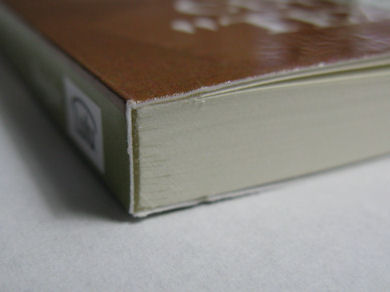
Photos and video are from the first “Unauthorized Edition” 163-page test print in September. More photos on Flickr.
Cost and time were our main constraints on this project. I can’t remember details on some of the other self-publishing/print-on-demand services, but Lulu seemed to be the most reasonably-priced and well-known. Grandpa didn’t want the book to be available to everyone in the world, so Lulu’s “Standard Grade” (vs. “Publisher Grade” quality) unregistered-ISBN printing service at around 5 cents per page seemed like a good option. It was $13.08 for his 252-page book and 99 cents for a PDF version (the latter is free to the person creating the book). There were several add-ons, like ISBN registration and cover design help, but we opted to go with the printing-only cost, so it made pricing simple—no signup fee or anything. We could have boosted the price of the book to make a profit, but again, Grandpa wanted it to be for family and friends only. See Lulu’s pricing chart for more details.
One of the great things about Lulu is that they offer a good variety of printing options, including eBook (EPUB or PDF). We went with a 6×9-inch book, but you can go up to 12×12 (hardcover) and as small as 4.25×6.87 (paperback). I’m going to suggest that Grandpa print a few hardcover copies for about 7 cents per page if we end up with a second edition of the book (we’ve already noticed several corrections that need to be made).
ADDITIONAL TECHNICAL NOTE (July 2015): One thing I forgot to suggest in my original review: Double-check the final PDF proof before ordering. If I recall correctly, once I had uploaded the Word document of the book to Lulu.com, it ran through an auto-conversion process and then produced a PDF which they use to do the actual printing. The only problem we noticed with this was that it created some blank pages in a photo section of the book that we had. I believe the “page break” feature in Word created this problem, but once I made a few adjustments, I was able to get the spacing to convert correctly.
Unpacking the “Unauthorized Edition” straight from Lulu in September:
Comments
42 responses to “A review of Lulu’s book-publishing service”
I just got back the book I made with Lulu. The binding is great, but the paper is like printer paper—I can see through it and it looks really matte and fragile. If I can find another place that does hardcover, I’ll be using them instead. I wish Createspace did hardcover.
Lulu Self-Publishing – A Review
I will start off by saying that Lulu are in my opinion, the greatest printing company in the world and everyone should use them.
I have eleven books printed with them. All of which I have the option of buying one off, or a thousand. There is no minimum order. That is a godsend as I cannot tell you how often I find a mistake that needs fixing after reading a physical copy. It means I don’t have to buy and store large qualities of books which have mistakes in. There is a discount for the more you buy which goes in increments of 15+ which is also a nice option.
The first order I made with them was for ten copies, off which they sent me eleven (one was free) which was very nice. Ever since then, I have received a coupon code EVERY single week via email to get discounts on future orders. You can unsubscribe from these weekly emails if you wish, but when there offering you a discount why would you.
The codes vary from 10% to 40% off, free shipping and others stuff and usually only last four days, before the code becomes inactive and the next one is sent for something different. As you might expect, the 40% off codes are rare and usually reserved for special occasions like Christmas week. You can also receive coupon codes through completing their surveys or liking their Facebook page and stuff like that. So you should never have to pay full price.
The basic package does not cost a thing and all you ever have to pay for are the books themselves and shipping. Shipping can be expensive (if you don’t use a coupon) when ordering one book as they come from the States (and I am in the UK). But when ordering many, that price is diluted somewhat. But wait until a free shipping offer arrives and your singing. I have never had customs to pay, ever. I think that’s because it goes through a UK base before being forwarded to me but I am guessing there.
All their marketing packages do cost money, but they have not harassed me once for a sale. They have my complete respect for allowing me to learn for myself, rather than them jamming it down my throat while asking for money – like some other companies have tried.
Personally I have avoided all marketing packages. I can do everything they plan to do myself but I know that for others that might not be an option so that will have to be something only you can decide. My books are specialist knowledge and so I know they will require me personally to sell. So no marketing package is off interest to me, I use the company for their printing services only.
To go down this free (printing only) route with Lulu will require some technical expertise though. I am competent with word, photoshop and acrobat. That allows me to make the pages with bleed margins, in jpeg and pdf, rotate and scale pages, work with guidelines and gutters. These are all requirements for a book and lulu services only print the books you send them.
If you send them a pdf or word doc not set-up correctly, they will NOT fix it for you – they just print it as is. If you want them to fix your mistakes you have to pay them, and trust me – even with all my skills it can take days if not weeks of work to fix each page. Whatever price they charge is a bargain. Having said that, you would be wise to learn how to do this yourself because if you ever plan on writing another book, its better to know how to set it up correctly before you start.
I presume most negative reviews will be from people who send them a word document and have failed to understand how gutters work.
They take payments via a variety of means, including PayPal. This is exceptionally valuable to me as I use Paypal as my primary online payment option and again, I am most grateful.
Converting word to pdf using their program is not as simple as you might hope. The software does its best but there are so many factors that can ruin the final product it’s a tough expectation to expect it to work first time. Everything from heading styles, footer notes, page numbers to the layout of your pictures can change how it looked in word to how it appears in the PDF before going to print. You should ALWAYS download the converted PDF and check it. Make sure it’s the right page count and it has the bad habbit of adding a blank page in the middle of the book, ruining your page number system and sending it out of sync with the contents page. As tedious as this might be, you need to properly examine the document for the changes it will have made. Its great in that it scales the page to the proper paper size, as Acrobat and Microsoft word cant even do that. But it is still a computer and cannot do see what the human eyes can.
Assigning Barcodes (ISPN) is another hurdle you will encounter. Many of their book options come automatically with a FREE Isbn assigned to it. This saves you money buying them independently. But I will point out that not all sizes get that treatment. One of my ten books is US Trade size which apparently was exempt from the barcode which I did not know about at the time of formatting, and only learned during the upload process.
Another issue you might have is with the cover design. For their wizard design program, it forces the barcode on the bottom right of the portrait shaped back cover. You have no option to remove this, nor can you move it or rotate it. They force you to have it if you use their designer software.
However there is a work around for this, in that you can download the pdf of the barcode, turn it in a jpeg, add it to your cover manually with photoshop and put it exactly where you want, then upload it using their advanced user one-piece cover page. Again, technical skills are going to be required to do this and it can be a trail and error thing working with the bleed area with a cover like this. But it is an option that’s free and means you maintain complete control over your entire book at all times.
Their customer service has been fantastic. I have sent several emails to their help desk and while occasionally I get generic responses that don’t answer my actual problem, I understand that this is because most of their users are not computer literate and they want to send them the most common fix list first. But once I get past that initial email, I speak to someone who recognises the problem and either sends me a personalised PSD template that conforms to their page dimensions (as pixel to mm can vary and its very useful to have page margins set up exactly to as they print, not just based on a number on their template which is slightly off) but they have also sent me free replacements for books which had a bad trim and a free coupon code for more books on top of that. There customer service is the best I have ever seen, in my entire life.
They have been very, very accommodating and helpful, which is my primary reason for why I am writing this very thorougher review. Its my way of saying thank you.
If you want to see a couple of the books they have printed for me, check out my book trailers on Youtube below. They are made to help sell the books, not talk about the printing process, but you will be able to see the products they make:
Marketing Magic – http://youtu.be/W0OjSEdrni0
Stories from the Life of a Magician: http://youtu.be/zrxm5Ox0JJQ
Amazing Bar Bets: http://youtu.be/LVocwxYztJo
Finally, I have just seen one of my books for sale on Amazon. With four different retailers selling it at a variety of prices, all cheaper than the RRP. This took me back a little, as I don’t recall ever asking for this to happen. I did not submit the book for sale on Amazon and if I did, it would be for the full amount. Furthermore, its opened my eyes to the names of three shell companies that appear to be under the umbrella of Lulu to suggest that the book is sold in more places than just one (when it isn’t). I know marketing wise, this is a good thing but still, I now know the company names and have seen the face behind the curtain as it were.
As I mentioned earlier in this review, my products are special interest and unlikely to have any consumer interest. So why was I finding my book on Amazon? How can I track any sales and how will I get paid if one does sell? These are all questions I cannot answer of yet.
I know there is an option to change the books release settings from private, general or direct. But it appears the difference between “general” and “direct” is a little hazy in its definition.
I have however left it alone and allowed it to sell. I am a writer and I want people to read my work, no-matter how they obtained my book. But an email to let me know they were doing this, or a link to the sales page after it was created would have been nice to have received. Its nice knowing my book is available in the worlds biggest book shop, I just wished they would have asked or told me, and I didn’t have to find out via a third party marketing company trying to sell me their services through a telemarketer cold call.
For many of you reading this, this final paragraph of finding your books on Amazon (which didn’t cost me a thing) is probably exactly what you want. I would presume lulu do this with many of their products and so this is another great things about the company. If you don’t want the book listed on Amazon, just keep the setting to “private”. As for how long it takes to appear on there, I would presume two months after the upload but again, I was not told it was even happening so have no idea when the sales page became active.
Overall, I cannot thank Lulu enough. They have allowed me to see physical copies of all my work which I can show to family and friends and I will continue to use them for many more years to come.
Great review, Im attempting to publish a kids book, all illustrations. I need the pages to be tough and hard to rip since its kids reading these things. Hows the quality of their pages?, I didnt see options to upgrade page quality on the website.
I have printed two children’s pictures books with them. Both were square shaped and the paper seemed strong enough for the children to read without tearing. I think its 150gm inside, which isnt strong but the 250gm cover helps protect it. I will say the books tend to curl after a period of time that is a signification of week paper though. So order one, with a free shipping coupon and check for yourself.
I will add however that I have looked around many printing companies for mass producing the picture books and its bad news on all fronts. The shape and size of the paper with full colour throughout makes it £5 per book. When RRP in the shops is often less than that for children’s books it a bad investment to make any profit.
The only way to possibly make it viable is to order 5000 copies through a company called “mint-print” or “hello print” which I found offered the best prices. But thats a lot to store and I worry about paper curling which might destroy stock.
If you choose however to take the risk, contact all the primary schools in your area and offer to sell them the books at £1 per copy as christmas presents for all the children. Its a quick and effective method for clearing a lot of stock quickly.
I published two e-books with Lulu and had poor results on both. Bad experiences. Guidance is poor and and incomplete. Font was printed much too small and page borders were not consistent. Quality Control is completely missing in their publishing process. One has to purchase a copy ( with high shipping rate) to find out that the font/format may not be correct. Their publishing “Wizard” will print ANYTHING that is submitted – there is no final check.There is no pride in what they print and sell. As a publisher – they fail.
I self-published with lulu this year and must say I’m happy with the product, design, everything. However… my questions were not answered (in emails… try calling and all you get is a voice mail box). Since the book is “out” I feel like lulu would just as soon have me “go away.” And now this:
Well, the Frankfurt Book Fair is over. Lulu (my
publisher) asked me if I’d be interested in having my book featured at the fair. Note the word ‘featured.” It cost $1,800.
I thought, what better exposure than that and signed on… and paid. The fair
ended October 12, and I had asked, via email, several times (and to different
recipients) to get some feedback. Nothing, but “I’m not the right person for
this. Finally, today, Oct. 27, (via voicemail) I was informed that there was no
lulu representative. No lulu brand. My book was among thousands of others at
what she called the “combined book exhibit.” Now, as far as I can tell, it was
NOT “featured.” And for that I paid lulu $1,800. I’d like to know lulu’s
definition of “featured.”
I self published a book 3 years ago thru Create Space. Based on the reviews here I will go to them for any more books I want to publish. I had no issues with them and each step of the way they told me if they needed a larger picture, etc.
There is no start up fee for CS and its a publish on demand like Lulu.
I regret purchasing a publication from LULU -worthless. Delivered the wrong book and would not refund any money to me. They are CRAP.
I am trying to publish hardcover book of 48 pages at Lulu. I want to keep the hardcover in color and the inner pages in black and white, as I do not have any images in the inner pages.
Few questions –
1. How/Where exactly do I need to mention I need just hardcover in color and inner pages in black and white? I only saw an option to select how many black and white pages and how many color pages need to be printed.
2. Would I still be charged $0.20 each page for color?
3. How long do they take to approve our file upload and start publishing?
I am just trying to order 2 copies of published books (hardcover) just for me and my dad.
I initially considered CreateSpace for publishing, but looks like they do not have hardcover printing… Or if they do, any help on how to request would be of great help!
PS: I have emailed CS customer support and still waiting for their reply.
Appreciate your help.
[…] Positive review – current as of June 5, 2012 […]
[…] title=”Positive review Lulu” href=”http://zepfanman.com/2010/12/review-lulu-book-publishing/” target=”_blank”>Positive review </a>- current as of June 5, […]
Please someone. I am 12. i have written a (in my opinion) pretty good book. if lulu isn’t a good place to publish, can someone please tell me a GOOD place to do it? thank you so much. i also don’t have much money, so some where not to expencive would be great. 🙂
I haven’t done enough research to know if it’s a good place to “publish,” but they’re probably the least expensive place to reproduce a small number of quality books (as I did for my grandfather, outlined in this blog post). Good luck!
[…] I have researched (Blurb – http://www.trustpilot.co.uk/review/blurb.co.uk), (Lulu – http://zepfanman.com/2010/12/review-lulu-book-publishing/) so that I can get more of an idea of the websites that I can use, and after having done this I […]
kvik lån…
A review of Lulu’s book-publishing service | Zepfanman.com…
This is a terrible company. Communication is not there.There is no customer service. If I was someone wanting to sell a book I would move on. I will NEVER buy a book from this site again
I just called and had a terrible experience. Trying to print a book and I called about pricing. I told them I needed a formal estimate, I used their calculator but need a formal estimate given my exact print job. He said, “What? What you got on the site is what it’s going to be and going through me it’s just going to be the same or higher.” I said, “Ok well I have different specs on printing I need priced and I also have general questions on your services before I decide to use your site.” He said, “Like what?” I said, “You know what, never mind, you have a great day, I’m going with someone else.” He chuckled and said, “Um ok.”
Real class.
So far the experience has been less than good. Customer service is S-L-O-W. You cannot call and you can only e-mail via a case number. Response varies from a day to several days.
I submitted photos for a cover. They did two versions. I loved the front cover on one version but needed the back cover adjusted for color and legibility. It took over a month and they revised the wrong cover.
I just received my final manuscript today and they ignored the small changes I submitted on their form.
Overall I’d say the experience has been frustrating. Hair pulling, teeth gnashing frustration.
Add to this the cost. WATCH FOR SALES! They run sales out of the blue. I missed a 20% off sale by two days.
I’m leery of how sales will be handled. If they are this incompetent with production, i can’t wait to see how they handle sales.I dont think they realize that this means income to some people. I
I’m a 12 year old looking for a publishing site. please, if this isn’t good, can someone please let me know of a good place to do so? thanks!
This site is fine, I’ve had absolutely no problems with any of the books I’ve published, and I have over 200 on Lulu.
I’ve completed my 145 page book and it’s being edited now. My son is going to do cover art and I also have some old photos to get restored before I include them. A friend recently published with Amazon’s self-publishing service and had a very good experience, but I like Lulu’s range of options better. It’s good to read the differing points of view here, and great seeing the video of receiving and opening that first copy. I hope to get it all together right after the first of the year and submit it. Thanks very much for your input and best of luck to you and your grandfather.
the most horrible customer service ever plus they are THIEVES…i ordered a book from them and they sent it to the wrong address..when i corrected their mistake via email they said basically ”to bad”….even if the book is returned to them they will not re send or give a refund…..thats stealing in my book….
lulu has TERRIBLE service. Don’t EVER try to cancel or you won’t get your money back.
Hi, I’m Ann and I’ve created a
blog allowing authors to compare services and prices for various Self-Publishing Companies. My blog provides both
negative and positive reviews for the different Publishing Companies. Thank you.
I don’t know. I ended up going with smashwords for e-books, and next Amazon for hard copy books. Lulu seemed to have too many complaints.
Is LuLu a good site? i mean is it safe and that sort of stuff?
the biggest problem with LULU is their customer service – essentially nonexistent – and their email service – completely borken (to the tune of HUNDREDS of the same automated emails flooding your inbox the second you attempt to contact them ABOUT ANYTHING).
Mr. Zepfanman, it is great to find your site and I am grateful you are willing to share your understanding of the Lulu publishing method. I am a retired (86) book editor but am at a loss with electronic publishing. I am sure it is simpler to do than I seem to believe. I have a collection of forty poems that I have put into a format that I chose from the Lulu options of sizes. Size: 5.83 x 8.26. This in itself is a wonder to me. Would that size be the book size in inches or the space allotted for the text?
Hi, thanks for an interesting review! I am trying to publish my grandfather’s diary written in 1915. I have scans of his diary and then transcribed text. I wanted to have both in the book. How does Lulu handle pictures/scans? Do I have the text in the word doc and then have the jpegs of the scans placed in the same word document as the transcribed text and upload it all as one document? I envision the transcription of the diary at the front of the book and the other half of the book as pictures of each handwritten page of his diary. Thanks for any help! Astrid.
You upload the entire document in one piece. As long as your scans are pretty good, they should turn out fine in black & white grayscale for the Lulu book. See my response below to a similar question from CindiSell: http://zepfanman.com/2010/12/review-lulu-book-publishing/#comment-379204993
Thanks for your quick reply! That sounds great. I will look below. One more question, though. When I incorporate the scans of my grandfather’s diary pages, we are talking about 100 trade size pages. Will that be too large to upload? I may need to see if they have a FTP site. Anyway, thanks again for your help.
Yes, they have FTP for files larger than 300MB. Their support page is pretty good if you have other questions like this.
http://connect.lulu.com/t5/Lulu-Connect-Self-publishing-and/tkbc-p/en_US
Thank you so much. I enjoyed sharing your excitement at receiving the book. I would be interested in knowing about how many pictures you had in the book. Any charts? What did you pay Lulu per copy? What would you do differently?
I’ll bet Grandpa and family are thrilled.,
All very good questions. I had 30 pictures at the end of the book, one every other page so the ink does not rub into the other pictures. I did not have any charts, but one thing I realized once I was all finished is that I could have converted to PDF BEFORE I uploaded the final document to Lulu. I initially thought they had some special processing to do, although the reason I uploaded in a word DOC was their warning that some fonts don’t work properly if you upload in PDF – not sure how significant the warning was, but I didn’t want to take a chance. I did not have any font problems uploading the DOC, but when Lulu converted it to print, there were a couple of page breaks that incorrectly spaced out the pages. If I had uploaded the whole thing as PDF, I would not have had that problem. Not sure how well I explained that, but it’s really the only regret I had. Everything else looked great. Oh, also on that note, I’m sure charts would look fine as lulu simply takes whatever you have in the final document you upload and prints it – it costs the same whether the content is a chart, photo, or just plain text.
252pp, $13.08 plus shipping; otherwise, no extra processing costs or anything like that. They do frequent deals and they also happened to have a free shipping deal when we ordered a reduced-price bulk shipment of 24 copies for $206.16.
For comparison, the initial draft that I printed had 163 pages, $7.76 per copy, plus shipping.
Hope that helps. Are you creating your own book?
My husband and I are doing personal histories. I have a novel. I have a short biography of my first husband.
I have a children’s book. (Now that we are retired you can see what we do with our time).
The novel is ready to go except for the cover. The others are in the pipeline.
Thank you so very much for the info. It is specific, and that is what we needed. Were any of the pictures in color?
We have had a difficult time deciding on a company. It’s all very confusing. Think I will do the short biography first. It is just for the cousins, children, and grandchildren. Lots of pictures.
In a message dated 12/4/2011 7:11:02 P.M. Eastern Standard Time, writes:
(http://disqus.com/)
zepfanman wrote, in response to CindiSell:
All very good questions. I had 30 pictures at the end of the book, one
every other page so the ink does not rub into the other pictures. I did not
have any charts, but one thing I realized once I was all finished is that I
could have converted to PDF BEFORE I uploaded the final document to Lulu. I
initially thought they had some special processing to do, although the
reason I uploaded in a word DOC was their warning that some fonts don’t work
properly if you upload in PDF – not sure how significant the warning was, but
I didn’t want to take a chance. I did not have any font problems uploading
the DOC, but when Lulu converted it to print, there were a couple of page
breaks that incorrectly spaced out the pages. If I had uploaded the whole
thing as PDF, I would not have had that problem. Not sure how well I
explained that, but it’s really the only regret I had. Everything else looked
great. Oh, also on that note, I’m sure charts would look fine as lulu simply
takes whatever you have in the final document you upload and prints it – it
costs the same whether the content is a chart, photo, or just plain text.
252pp, $13.08 plus shipping; otherwise, no extra processing costs or
anything like that. They do frequent deals and they also happened to have a free
shipping deal when we ordered a reduced-price bulk shipment of 24 copies
for $206.16.
For comparison, the initial draft that I printed had 163 pages, $7.76 per
copy, plus shipping.
Hope that helps. Are you creating your own book?
_Link to comment_ (http://disq.us/4g7zp6)
Yes, it’s no fun trying to wade through all the literature and different websites while you’re trying to decide what service and options to use. I just updated the link to the pricing page in the blog entry above: http://connect.lulu.com/t5/Product-Information/How-much-will-my-printed-book-cost/ta-p/33671
Basically, instead of $.02 per page, it shoots way up to $.20 for color (for every page in the book, not just the pages with color on them). As you’d expect, we opted not to do color.
Zepfanman,
I, too, am thinking of using lulu for my 6 x 9. I have already formatted my word document this way, with .75″ margins, a .5″ gutter, double-spaced. Is this appropriate? Should I change anything? There aren’t any pictures, but there are footnotes, displayed on each occurring page.
Thanks for all of your effort. It is clear to see that you and your grandfather are so close, and that you both dedicated quality time and energy to see this project to completion.
Thank you!
I slightly modified the default Lulu Word template. Your margins are good, but I only had about 1/8″ gutter which alternated on the right and left sides. You can kind of see how that looks in my pictures and video. Plenty of space in the gutter and easily readable. I did have a problem towards the end of my book when lulu automatically converted the document to PDF, it added a couple of extra pages (throwing off the gutter alternation) after some of my pictures because I had them too close to the margin and the conversion doesn’t always end up exactly how the Word doc looks – hope that makes sense. In short, I would convert to PDF yourself, then upload that.
Templates:http://connect.lulu.com/t5/Interior-Formatting/Templates-for-books-and-discs/ta-p/33674
Zepfanman, You likely wound up with an excess of pages when Lulu converted to PDF because…. do you have Word 2010, or even the 2007 version? I’m betting not. Lulu only converts to PDF correctly from a Word ’97-2003 file. Yes it’s true: search their “help” forum, which is populated—I am quite sure—by fictional characters with yes, names and photos, such as “David Woodward.”
If I sound like a conspiracy theorist, I invite anyone to jump in and tell me why my book is not yet on Amazon. My theory is that Lulu is dying and needs to push their (paid) services more every day. Seriously, the text on their website is perpetually changing: from dialog boxes to their supposed “help” pages (written by, you guessed it, “David Woodward”). I challenge anyone to say they had a smooth ride with Lulu. Clearly, Zepfanman, you have editorial and graphics specialists at your beck and call, or else you would not have the results you show in your video. Perhaps you are a publishing pro yourself (like me); even so, I find this company, at this point, to be a laughingstock. Which isn’t good, because my book is not yet on Amazon, where I need it to be after all this work.
If this message disappears soon, I will know that you too are part of the conspiracy to keep Lulu going! Hahahahahaha…..
Hi there!
I´m considering using Lulu for selling a book without any editor.
Thanks for your video and review, it was very helpful!!
Rosamunda
You’re welcome. I’m glad you found it helpful. I hadn’t noticed many reviews of the service when I was shopping around, so that’s why I did this. Good luck with yours – and post a link to it here when you release it!
Rosamunda,
If I were you I would find an inexpensive editor beause we all make mistakes that we can’t see ourselves and an editor will alert you of these thing. For $1.50 a page, there’s a guy at AurthorsDen.com, Services Marketplace. Or if you can afford $2.00 per page, there are many to choose from in the back of Writers Digest magazine.
MT